
Introduction
In Nigeria, the smartphone revolution has transformed how we communicate, interact, and consume information. However, one common frustration many Nigerians experience while using their Android phones is persistent ads. Whether it’s during app usage, video streaming, or even simple browsing, annoying advertisements can hinder the user experience significantly. This blog post will explore how to effectively remove ads from your Android phone in Nigeria, ensuring smoother operation and less distraction.
With the rising number of Android users in Nigeria, it is crucial to have strategies in place to combat the influx of advertisements that can bog down device performance and disrupt enjoyment. From using dedicated apps designed to block ads to simple adjustments within your phone’s settings, a variety of methods are available to reclaim your phone from this advertising invasion. By the end of this article, readers will have a comprehensive understanding of the tools and techniques available to keep their devices ad-free.
So, if you’re tired of those persistent ads interrupting your favorite apps or streaming your go-to shows, stay with us as we discuss various practical steps, tools, and tips to remove ads effectively. Let’s dive into everything you need to know about taking control of your Android experience in Nigeria!
What You Need
Before you embark on your ad-removal journey, it’s essential to gather the necessary tools and information. Here’s a list of everything you’ll need to effectively block ads on your Android device in Nigeria:
- An Android Device: Ensure your Android phone is updated to at least Android 6.0 (Marshmallow) or higher.
- Internet Connection: A stable internet connection to download necessary apps or updates.
- Ad-Blocking Apps: Consider installing apps like AdGuard, Blokada, or AdAway (note: some apps may require advanced configurations).
- Knowledge of Settings: Familiarity with your device’s security and app settings will help you make necessary adjustments.
- Proper Device Permissions: Make sure you understand how to grant permissions to ad-blocking applications.
Fees: Most of these tools are available for free, but some may offer premium features ranging from N3,000 to N10,000 per year. Always check the Google Play Store for the latest pricing.
Step-by-Step Guide
Now that you’ve equipped yourself with the necessary tools, let’s go through the precise steps to effectively block ads on your Android device.
Step 1: Update Your Device Software
Keeping your device software updated is vital for security and performance improvements. Advertisers often exploit outdated systems, leading to a flood of ads.
- Go to Settings.
- Scroll to System.
- Select System updates to check for the latest version.
- Download and install any available updates.
Timeframe: This usually takes about 10-30 minutes, depending on your internet speed.
Step 2: Install an Ad-Blocker
An effective ad-blocker is one of the primary defenses against unwanted ads.
- Open the Google Play Store.
- Search for AdGuard and tap on Install.
- Once installed, open the app and follow the setup instructions.
- Grant the necessary permissions to allow it to filter traffic.
Costs: AdGuard is free for basic features; premium versions can cost around N5,000 per year.
Step 3: Configure the Ad-Blocker Settings
After installation, proper configuration of the ad-blocker is crucial.
- Launch AdGuard.
- Navigate to the settings or options menu.
- Enable protection, and adjust your filtering settings according to your preferences.
- Test the functionality by visiting a site known for numerous ads.
Tip: Most ad-blockers periodically update their filters, so ensure the app remains updated to keep ads at bay.
Step 4: Disable Pop-ups in Browser Settings
Web browsers are often major sources of unwanted pop-ups and ads.
- Open your browser (e.g., Chrome or Firefox).
- Navigate to Settings.
- Scroll to Site settings.
- Select Pop-ups and redirects and turn this option off.
Timeframe: This task should take less than 5 minutes.
Step 5: Uninstall Suspicious Apps
Some apps generate ads unexpectedly. Identifying and removing these apps is important.
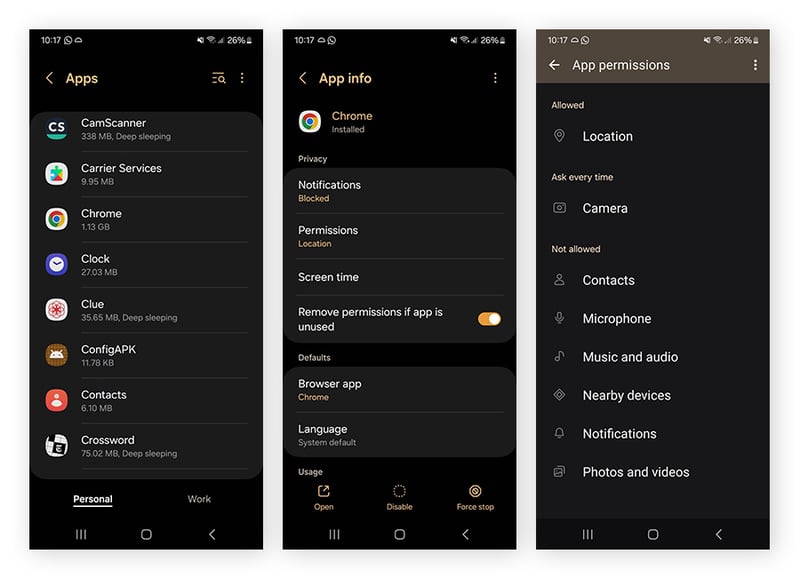
- Go to Settings.
- Select Apps or Application Manager.
- Review the list and look for any unfamiliar or recently downloaded apps.
- Uninstall any app that appears suspicious by selecting it and tapping Uninstall.
Tip: Consider keeping a list of installed apps to compare after cleaning.
Step 6: Reset App Preferences
If ads persist despite your efforts, resetting app preferences can help.
- Go to Settings.
- Select Apps or Application Manager.
- Tap on the three dots (menu icon) in the top right corner.
- Select Reset app preferences to return app settings to default.
Note: This will not delete any app data but will undo custom settings.
Step 7: Reboot Your Device
A simple reboot can sometimes resolve lingering issues.
- Press and hold the power button.
- Select Restart from the menu that appears.
Timeframe: A reboot takes only a few minutes.
Costs and Fees
To effectively remove ads from your Android phone in Nigeria, here’s a breakdown of potential costs associated with the necessary tools and applications:
| Item | Description | Estimated Cost (in Naira) |
|---|---|---|
| AdGuard (Premium) | Yearly subscription for ad-blocking | N5,000 – N10,000 |
| Data Charges | For downloading apps and updates | N1,000 – N5,000 (depending on data plan) |
| Device Updates | Optional fees for software if applicable | Free |
Total Estimated Cost: Between N6,000 and N15,000, mainly dependent on your choice of ad-blocking solutions and data costs.
Comparison
Here is a comparison of popular ad-blocking applications available for Android devices:
| Ad-Blocker | Cost | Features | User Rating |
|---|---|---|---|
| AdGuard | N5,000 – N10,000/year | Extensive filtering options, user-friendly interface | 4.8/5 |
| Blokada | Free | Open-source, works without rooting | 4.6/5 |
| AdAway | Free (requires root) | Hosts-based ad-blocking, advanced settings | 4.7/5 |
Common Mistakes to Avoid
When attempting to block ads, many Nigerians fall into several traps. Here are some common mistakes and how to avoid them:
- Skipping Software Updates: Neglecting to update software can leave vulnerabilities that allow ads. Always check for updates in Settings.
- Not Reviewing App Permissions: Failing to grant necessary permissions to ad-blocking apps can limit their effectiveness. Ensure you complete all setup steps carefully.
- Overlooking Browser Settings: Many users forget browser configurations, which can lead to ads slipping through. Regularly adjust browser settings related to pop-ups and redirects.
- Installing Unverified Apps: Downloading ad-blockers from untrusted sources can expose your device to malware. Always use the Google Play Store.
- Ignoring System Settings: Some ads might be triggered by system settings that haven’t been adjusted. Review all settings available under Apps and Settings.
Tips and Insider Knowledge
To ensure a smoother experience while tackling advertisements on your phones, consider the following insider tips that many Nigerians may not be aware of:
- Use Multiple Ad-Blockers: Sometimes, using two different ad-blocking solutions concurrently can provide better results. Just ensure one is a browser extension while the other is a system-wide block.
- Be Mindful of Free Data Promotions: Network providers like MTN and Glo often run promotions offering free browsing data. Utilize these to download your necessary apps without incurring extra costs.
- Monitor App Performance: If you notice increased ads after installing a specific app, consider uninstalling it immediately.
- Community Forums: Engage in local online forums and groups, such as those on Reddit, to stay updated on the latest ad-blocking methods popular among Nigerians.
- Device-specific Solutions: Some smartphones, like Tecno or Infinix, may have built-in ad-blocking features. Check if your device has this functionality.
Frequently Asked Questions
1. Can I block ads on all types of apps on my Android phone?
Yes, with the right ad-blocking applications, you can block ads on almost all apps. However, some apps may have in-built ads that are more difficult to eliminate and may require specific settings to adjust.
2. Are ad-blockers illegal in Nigeria?
No, using ad-blockers is not illegal in Nigeria; they are widely accepted as tools to enhance the user experience by providing a cleaner interface.
3. Will blocking ads affect my apps’ performance?
Blocking ads can often improve your apps’ performance, as they will not be loading and displaying ads, resulting in faster operation and less data usage.
4. Are there any free options available for blocking ads?
Yes, options like Blokada and certain features of AdGuard are available for free. They may not offer as extensive functionalities as their premium counterparts, but they can significantly reduce the number of ads.
5. How often should I update my ad-blocking apps?
It’s advisable to check for updates once a month. Developers frequently improve their ad-blockers to adapt to new forms of advertising, and keeping your app updated can ensure maximum effectiveness.
Conclusion
Removing ads from your Android phone in Nigeria is not just about making your device experience enjoyable; it’s about enhancing performance, speed, and overall satisfaction. By following the detailed steps outlined, utilizing effective tools, and remaining vigilant about app permissions and settings, you can reclaim your Android device from the clutches of endless ads. Remember, with consistency and the right strategies, you can keep distractions at bay and enjoy an uninterrupted smartphone experience.
